
Betting
Everygame Withdrawal Guide – Fees, Time, Limits & Problems
Find out what withdrawals this bookmaker entail. We examine the Everygame withdrawal times, payment methods, fees, and transaction limits you’ll encounter.
published: 2024-09-11
Last updated: 2025-09-10

SportsBoom offers honest and impartial bookmaker reviews to help you make informed choices. While we may earn commissions through affiliate links, our content remains independent and free from promotional influence. For more information, see our Content Transparency and How We Review pages.
- Established brand with long history
- Broad variety of games
- Multiple payment options




 Payout80%
 No. of Games100+
 Live Games
 Reputable License
 Slots
Slots Table Games
 Instant Win
 Must Win Jackpots
- Established brand with long history
- Broad variety of games
- Multiple payment options
When wagering at a sports betting platform, one of the essential features you should check out is its withdrawal process. It’s vital to know which payment methods are available for both deposits and withdrawals.
That way, you can use a deposit method from the start that’s also eligible for withdrawals and prevent any payment verification delays. We examine the Everygame withdrawal time, fees, limits, and process to give you a better idea of what to expect.
Step-By-Step Guide How to Withdraw Money from Everygame
To make withdrawals, follow our expert guide below:
- 1
Log into your account to start withdrawing funds
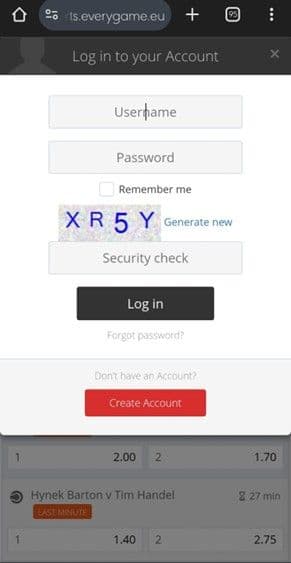
Image Credits: Everygame
- 2
Click on your betting username to see a drop-down list
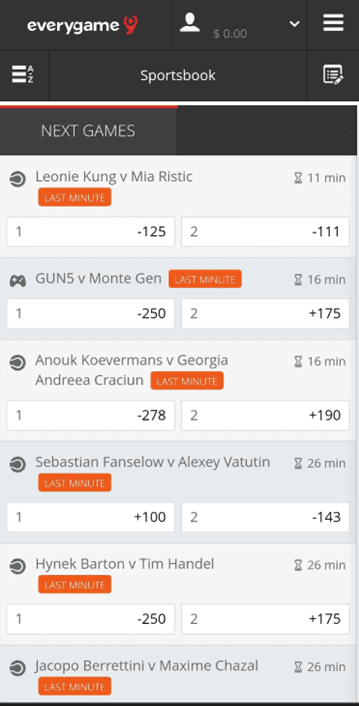
Image Credits: Everygame
- 3
Navigate to the “Deposit Now” button
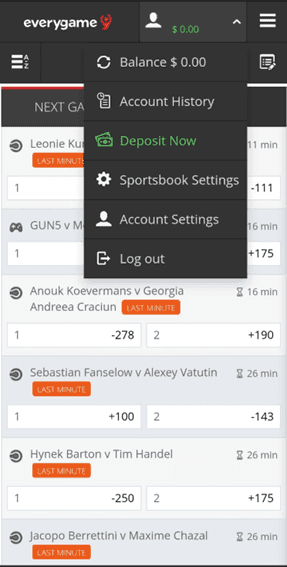
Image Credits: Everygame
- 4
In the sidebar, switch to the “Withdraw” screen
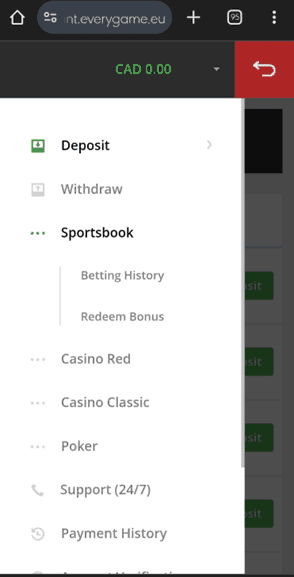
Image Credits: Everygame
- 5
Click on the green “Withdraw” button of your preferred payment method to get started
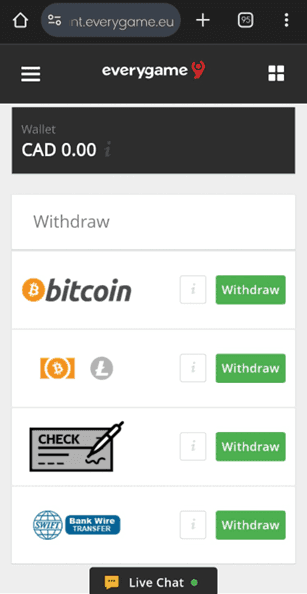
Image Credits: Everygame
- 6
Add all of the necessary details and approve the request
- 7
You’ll receive your funds once the withdrawal processing times are over
Withdrawal Options
There are several payment methods available for withdrawals, though the Everygame withdrawal terms might dictate that some are only eligible in specific jurisdictions.
The best way to know which methods are available to you is to access the cashier once registered.
However, we’ve listed a few of the standard methods. Most bettors have access to Bitcoin, Cheques, Bank Wire, and Altcoins.
Everygame Withdrawal Time
We check out the timeframe of how long it takes to withdraw from Everygame. Crypto bettors have the best withdrawal processing times, as Bitcoin and Altcoins take about 48 hours to withdraw. However, the same period doesn’t apply to bank wires or cheques.
The Everygame cash withdrawal time for cheques can take up to 5 business days. Meanwhile, the processing time for bank wire takes between 10 and 15 business days.
Minimum and Maximum Withdrawal Limits
The Everygame betting site has different withdrawal limits depending on the payment method you select. The minimum we managed to find is $100 which we think is very high for most users. Crypto has a max limit of $2,500.
Meanwhile, the payment limits for cheques and bank wire transfers have a minimum of $150. The maximum limit for cheques is $3,000, and the maximum for bank wire transfers is $2,500.
Withdrawal Fees
The only withdrawal methods without fees are the crypto options, meaning Bitcoin and Altcoin. Cheques and bank wire transfers charge $50 or more in fees.
Verification Process
Before you can withdraw, you must verify your account. You’ll see a message pop up asking you to complete the verification if you try to do it before providing the necessary documents. In your user profile, there’s an option called ‘Account Verification’ in the sidebar.
Clicking on this will show you the guidelines that explain how to verify your account. Send the following documents to the verification email (documents@everygame.eu) to verify your account:
Passport, national ID, or Driver’s licence
Utility Bill or bank statement
Picture of your bank card, e-wallet, or crypto wallet
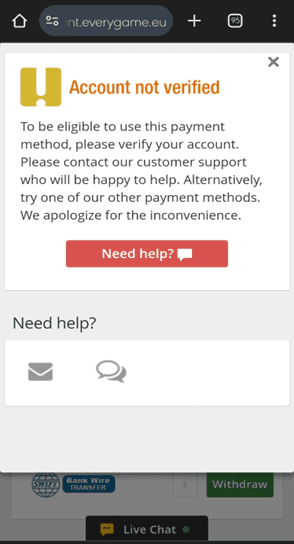
Image Credits: Everygame
Withdrawal Problems
Sometimes, issues can crop up while you’re making withdrawals. If you are facing withdrawal problems then check out our possible reasons and solutions below.
Have you met the play-through requirements?
If you’ve claimed a promotion, you likely have wagering requirements you must satisfy. Trying to withdraw without completing them can result in Everygame withdrawal problems.
Did you meet the minimum limit?
This bookmaker has a high minimum limit, so it’s not too odd to imagine that you accidentally entered a lower amount. You must withdraw at least $100 with cryptos and $150 with fiat to meet the minimum limits.
Is your account verified?
Without verifying your account, you won’t be able to make withdrawals. In fact, if you see your Everygame withdrawal is suspended, outstanding verification documents might be the reason why. You can contact Everygame customer support to learn what documents you still need to provide.
Did you experience computer-related problems?
If your computer or mobile unexpectedly shut down or lost internet connection, it could have disrupted your withdrawal process. Check your transaction history to see if it’s listed there, and try it again if it’s not.

Anders is an iGaming specialist with 7 years experience in content creation and strategy implementation in both the casino and betting industry across diverse markets with main focus on the Nordics.
Other Betting Site Withdrawal Methods
- Nairabet Withdrawals
- Mozzart Bet Withdrawals
- Bet O Bet Withdrawals
- 10Cric Withdrawals
- 4RABET Withdrawals
- Betking Withdrawals
- Paripesa Withdrawals
- Bet9ja Withdrawals
- BC.Game Withdrawals
- BetWinner Withdrawals
- N1Bet Withdrawals
- Pinnacle Sports Withdrawals
- 22BET Withdrawals
- Luckster Withdrawals
- Bettilt Withdrawals
- Stake Withdrawals
- Melbet Withdrawals
- PariMatch Withdrawals
- Zet Bet Withdrawals
- Betano Withdrawals